ChatGPT
With the CADshift for AutoCAD connector, ChatGPT can work in the AutoCAD on your PC. ChatGPT talks to the CADshift relay at cadshift.com, and the relay passes each request to your AutoCAD.
There are two parts: your workspace admin adds CADshift once for the workspace, and each user connects and signs in.
For users
What you need
- CADshift AI for AutoCAD installed, and AutoCAD 2025, 2026 or 2027.
- A ChatGPT Business, Enterprise or Edu workspace. Personal ChatGPT plans can’t add connectors that change things.
- Your workspace admin has added CADshift for AutoCAD (see For IT below). If you can’t find it in ChatGPT, ask them.
- A cadshift.com account with a CADshift for AutoCAD trial or plan. Use the same account in AutoCAD and in ChatGPT.
- The plan’s licence key, activated once on each computer (step 1). Signing in alone does not license a computer.
1. Sign in and activate this computer in AutoCAD
- Open AutoCAD and press the CADshift button on the CADshift tab. It opens the CADshift window.
- On the Account tab, press Sign in. (Or type
CADSHIFTSIGNINat the command line.) Your browser opens cadshift.com; sign in with your CADshift account. - On the Licence tab, paste your licence key and press Activate. (Or type
CADSHIFTLICENSE.) The key is in your purchase email and on cadshift.com under CADshift AI for AutoCAD, Subscription & licences. Each computer uses one seat of your plan. - On the Status tab, the Account line should read Signed in as (your email). Connected: ChatGPT and Copilot can use this AutoCAD. and the Licence line This computer is licensed. The same relay connection serves both.
You do this once on each computer. After that, AutoCAD connects to the relay by itself every time it starts. See the CADshift button for the whole window.
2. Connect CADshift in ChatGPT
Open chatgpt.com in your workspace.
In a new chat, press + next to Ask ChatGPT and choose CADshift for AutoCAD (Drive AutoCAD on your PC through the CADshift relay). It shows as a chip at the start of your message.
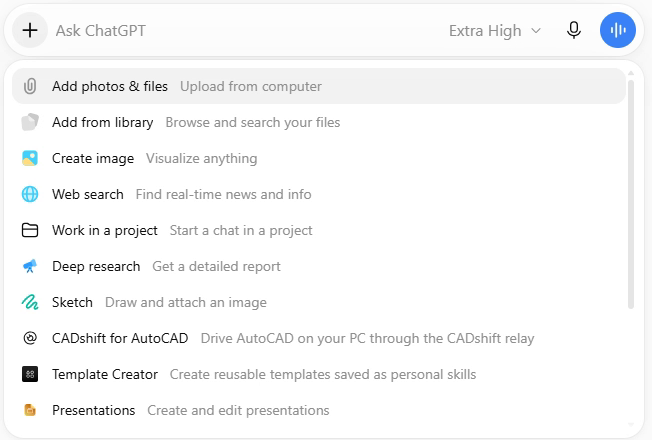
The first time, ChatGPT sends you to cadshift.com to sign in. Use the same CADshift account as in AutoCAD, and allow ChatGPT when asked.
The connection renews itself: it lasts 14 days and extends each time you use it, so you don’t sign in again while you keep using it.
3. Ask something
With AutoCAD open and a drawing loaded, try:
- “Give me a short overview of the drawing open in AutoCAD.”
- “Check the open drawing against our drafting standard and summarise the main problems.”
ChatGPT decides which tool calls to confirm with you. When it does, it shows a card, Allow ChatGPT to use CADshift for AutoCAD?, with what the call will do. Choose Allow once to let it go ahead, or Deny.
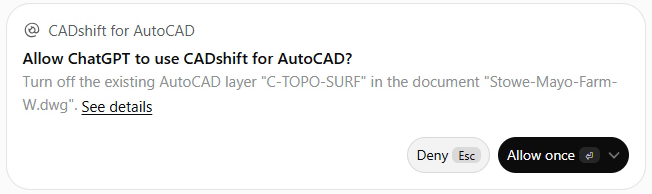
ChatGPT doesn’t ask before every change: in our tests it asked before turning a layer off, but drew new geometry without asking. Every change is one undo step in AutoCAD, so U undoes it.
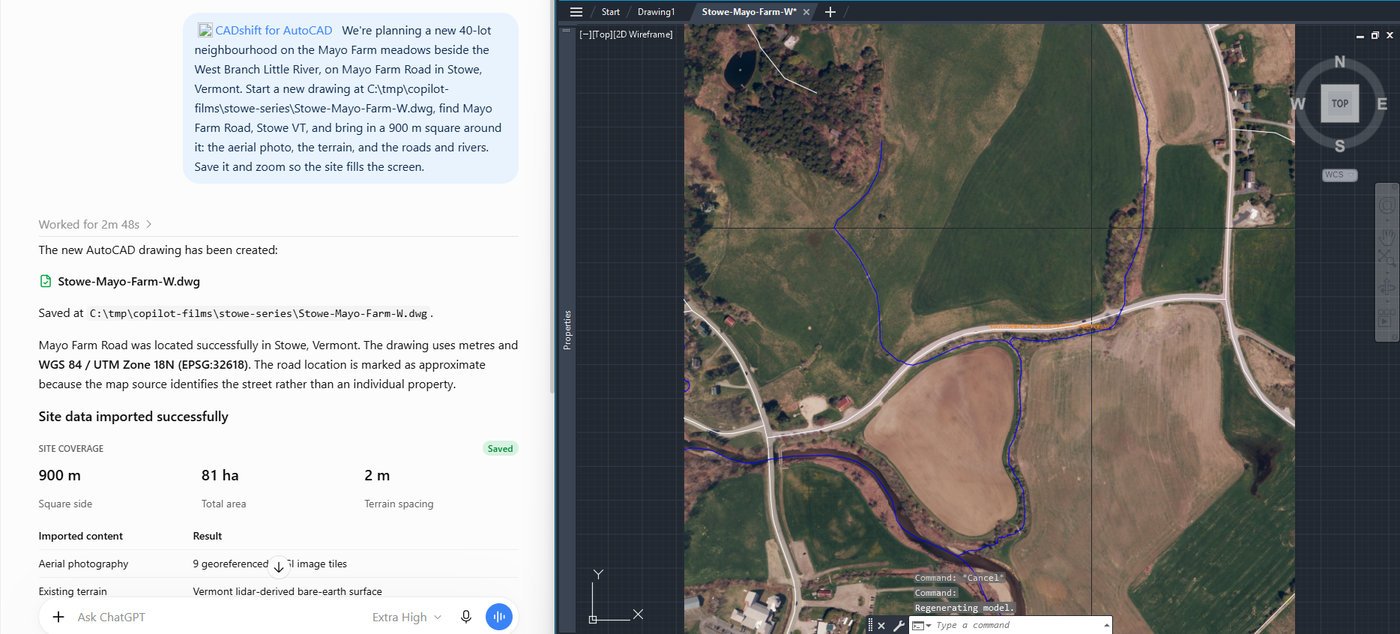
Keep AutoCAD open
If it doesn’t work
| What you see | What to do |
|---|---|
| CADshift for AutoCAD isn’t in ChatGPT’s list | Your workspace admin hasn’t added it, or hasn’t made it available to you. Ask them (For IT). |
| ChatGPT says This computer has no active CADshift licence, so the CADshift tools cannot run on it | The computer has not been activated, for example after updating to CADshift 0.6.3 if you only ever signed in. In AutoCAD, press the CADshift button, open the Licence tab, paste your key and press Activate (or type CADSHIFTLICENSE). The key is on cadshift.com under CADshift AI for AutoCAD, Subscription & licences. |
| ChatGPT says No AutoCAD is connected for this account | Open AutoCAD and press the CADshift button. If the Account line on the Status tab doesn’t say Connected, press Sign in on the Account tab. If it does, ChatGPT’s connector is signed in with a different CADshift account from AutoCAD’s: in ChatGPT, disconnect CADshift for AutoCAD and connect again with the account you use in AutoCAD. |
| ChatGPT says This account has no CADshift AI subscription (or its trial has ended) | The CADshift account ChatGPT signed in with has no plan, or its trial is over. Subscribe at cadshift.com, or ask your administrator; if you have a plan on another account, connect ChatGPT again with that account. |
| ChatGPT says To start your free 14-day CADshift trial, open … | Open the link, sign in and accept the terms, then ask again. |
| ChatGPT asks you to sign in again | You hadn’t used it for more than 14 days, or your admin changed the connector. Sign in again. |
More in Troubleshooting.
For IT
The workspace admin adds CADshift once, at admin.openai.com, as a custom MCP connector with the address https://cadshift.com/mcp and OAuth. Nothing more is installed on the PCs. Each user needs a CADshift trial or plan.
The step-by-step guide is For IT: add CADshift to ChatGPT.
- Previous
- For IT: add CADshift to Copilot